

Tables in rich text are where good content models go to die. An author pastes a pricing table from Excel, the RTE keeps half the formatting and invents the other half, somebody merges two cells to “fix” it, and three months later the front end team is writing CSS to target td[style*="mso-"]. I’ve seen it on more projects than I’d like to admit.
Grid Composer is my answer to that. It’s a Marketplace custom field for the SitecoreAI Page builder that gives authors an actual table editor, and saves the table as structured JSON instead of HTML. The head app renders it with real markup, your styles, and none of the leftovers. It got the same cleanup as Alert Banner Builder this week, so here’s the tour.
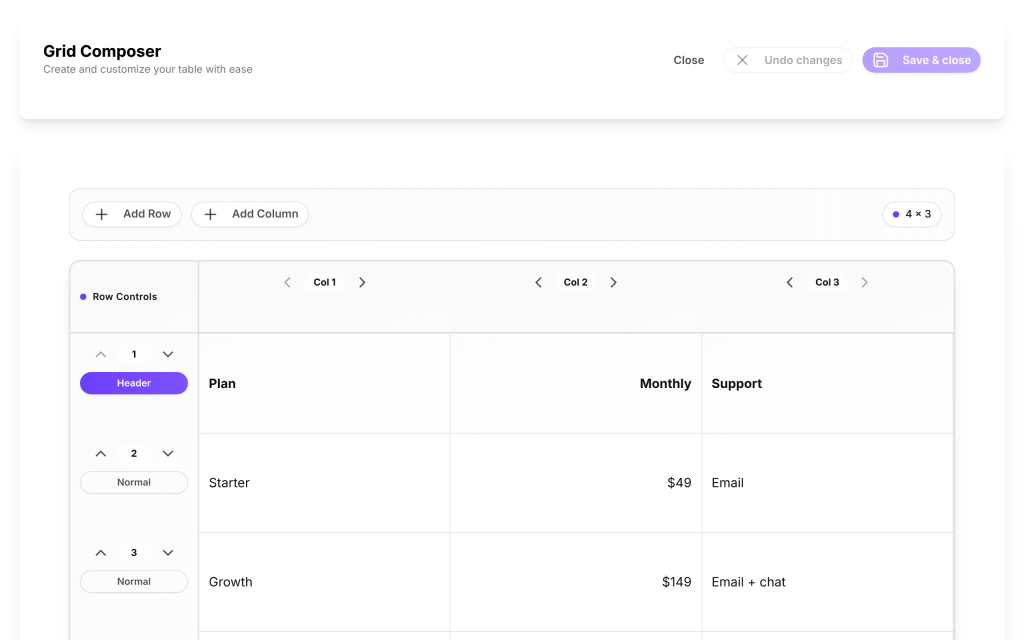
What Authors Get
- Rows and columns – add, insert, remove and reorder both
- Inline editing – click a cell, type, Enter to keep it, Escape to back out
- Header rows – toggle any row as a header, which becomes a real
<thead>on the site - Cell formatting – horizontal and vertical alignment and font weight, per cell
That’s deliberately it. No colors per cell, no font sizes, no merging (yet). Every formatting option you hand authors is one more way for a table to drift away from the design system. Alignment and weight cover what tables actually need, like right-aligning numbers and bolding a total row.
The Data
Here’s what lands in the field:
{
  "version": "1.0",
  "columns": [{ "id": "c1" }, { "id": "c2" }],
  "rows": [
    {
      "id": "r1",
      "isHeader": true,
      "cells": [
        { "id": "a", "content": "Plan", "format": { "fontWeight": "bold" } },
        { "id": "b", "content": "Monthly", "format": { "align": "right" } }
      ]
    },
    {
      "id": "r2",
      "cells": [
        { "id": "c", "content": "Starter" },
        { "id": "d", "content": "$49", "format": { "align": "right" } }
      ]
    }
  ],
  "settings": { "hasHeaderRow": true, "hasBorders": true },
  "metadata": { "modified": "2026-11-26T18:00:00.000Z" }
}
A few decisions worth calling out. The version property is there so the shape can evolve without breaking content that’s already saved in real environments. Every row has exactly one cell per column, and the editor validates that before saving. And cell content is plain text. Not HTML. If you want links in tables, that’s a feature to design on purpose, not something that sneaks in through a paste.
Reading the Field Value Safely
One thing I tightened up: client.getValue() is typed as Promise<any>, and the original code assumed it always came back as a string. Most of the time it does. But the Sitecore custom field sample itself handles both a JSON string and an already-parsed object, so I made the app do the same with a tiny helper that lives in the shared provider:
export function normalizeFieldValue(value: unknown): string | null {
  if (value === null || value === undefined) return null;
  if (typeof value === "string") return value.trim() ? value : null;
  try {
    return JSON.stringify(value);
  } catch {
    return null;
  }
}

// in the field component
const fieldValue = normalizeFieldValue(await client.getValue());
let parsedData = fieldValue ? parseTableData(fieldValue) : null;

if (!parsedData) {
  // Empty or invalid field: start a fresh 3x3 table instead of crashing
  parsedData = createEmptyTable(3, 3, true);
}
If the stored value is junk (somebody hand-edited it in the Content Editor, it happens), the author gets a fresh table and a message saying so. Way better than a blank iframe.
The Unsaved Changes Indicator That Was Always On
The editor shows an “Unsaved changes” pill and only enables Save when something actually changed. Except it was always on after the first edit, even if you changed a cell and then changed it right back. The comparison was full JSON against full JSON:
// Before
const newSerialized = serializeTableData(newData);
setIsDirty(newSerialized !== originalData);
Looks fine, right? The catch is that serializeTableData stamps metadata.modified with the current time on every call, so two identical tables never serialize the same. The fix is to compare content and ignore metadata:
function contentKey(data: TableData): string {
  return JSON.stringify({ ...data, metadata: undefined });
}

const original = originalData ? parseTableData(originalData) : null;
setIsDirty(!original || contentKey(newData) !== contentKey(original));
Small thing, but authors notice when the UI says they have unsaved work and they don’t. It makes them second guess every other indicator in the app too.
Rendering It
The repo includes examples/content-sdk/GridTable.tsx, a Content SDK component you can drop into your head app. It doesn’t need any client-side JavaScript, so it works fine as a server component. The main loop:
export const Default = ({ fields, params }: GridTableProps) => {
  const table = parseTable(fields?.Table?.value);
  if (!table || table.rows.length === 0) return null;

  const headerRows = table.rows.filter((row) => row.isHeader);
  const bodyRows = table.rows.filter((row) => !row.isHeader);
  const defaults = table.settings?.defaultCellFormat;

  return (
    <div className="grid-table__scroll" style={{ overflowX: 'auto' }}>
      <table className={classes}>
        {table.settings?.caption && <caption>{table.settings.caption}</caption>}
        {headerRows.length > 0 && (
          <thead>
            {headerRows.map((row) => (
              <tr key={row.id}>
                {row.cells.map((cell) => (
                  <th key={cell.id} scope="col" style={cellStyle(cell.format, defaults)}>
                    {cell.content}
                  </th>
                ))}
              </tr>
            ))}
          </thead>
        )}
        <tbody>
          {bodyRows.map((row) => (
            <tr key={row.id}>
              {row.cells.map((cell) => (
                <td key={cell.id} style={cellStyle(cell.format, defaults)}>
                  {cell.content}
                </td>
              ))}
            </tr>
          ))}
        </tbody>
      </table>
    </div>
  );
};
Real <th scope="col"> headers, an optional <caption>, and a scroll wrapper so a wide table scrolls sideways on a phone instead of blowing out the layout. Content renders as text, so if someone types <b> into a cell it shows up literally. The cellStyle helper also only lets plain color values into inline styles, so nobody can smuggle background:url(...) in through the JSON.
Implementation Notes
- Template setup – add a field with type Marketplace Types > Plugin and your app ID as the Source, same as any custom field
- Field name – the example expects
Table, rename it in the props type to match your template - Styling – the component outputs
grid-table,grid-table--borderedandgrid-table--stripedclasses, so the look stays in your CSS - Same refresh as Alert Banner Builder – Next.js 16, the latest Marketplace SDK, retrying provider, save then close, CI on pull requests
Where It Could Go
This one has a lot of room to grow, and I’d love help. Pasting a range from Excel or Google Sheets straight into the grid would be huge for authors. Cell merging is the obvious big one. Column widths in the editor, keyboard navigation between cells, and UI toggles for caption, borders and striping (those are already in the JSON schema, just not exposed yet) are all great first contributions.
If you build something on top of it, or you’ve solved tables differently on your own SitecoreAI builds, let me know.
Remember to:
- Keep tables as data – JSON in the field, markup in the head app
- Handle both value shapes –
getValue()can hand you a string or an object - Compare content, not timestamps – when you track unsaved changes
- Grab an issue – the README has a list of ideas waiting for someone